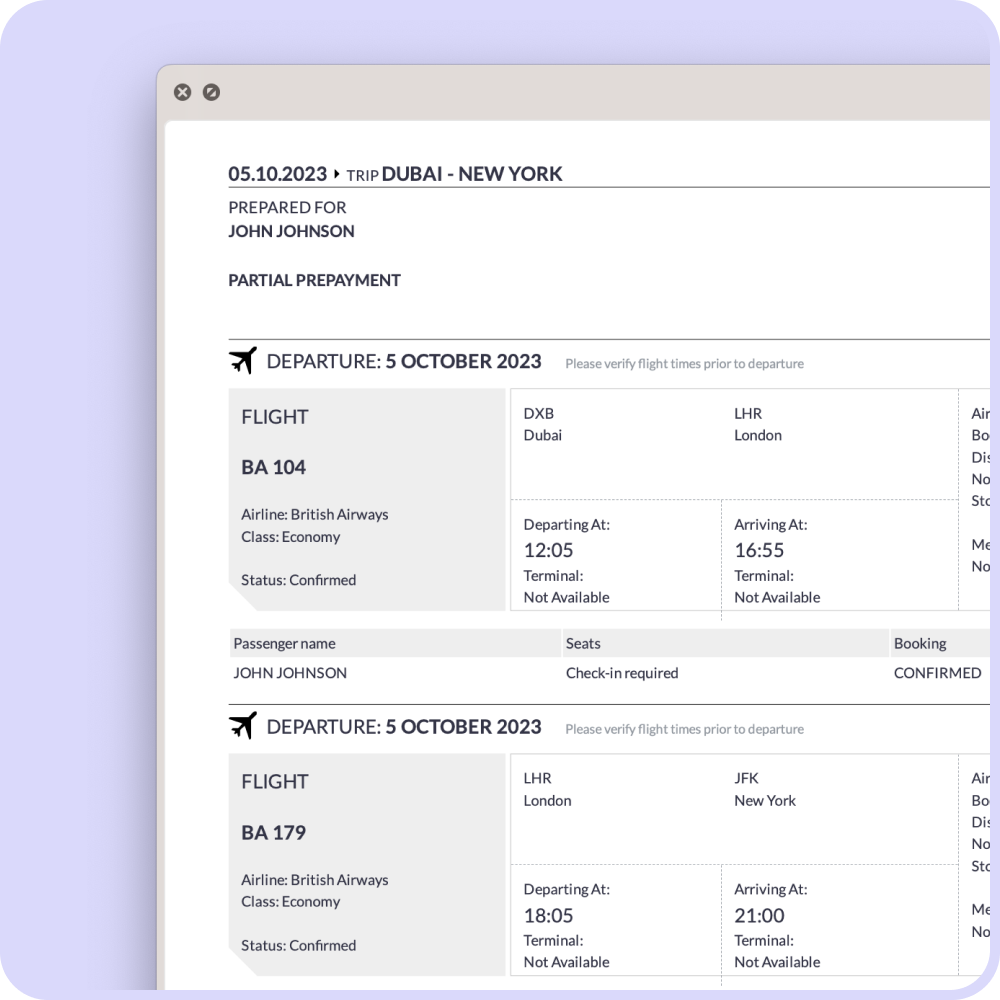
When applying for a visa, you may be asked to provide a flight itinerary or reservation showing your proposed travel dates. Before submitting it, you should check that the passenger details, itinerary and booking reference are correct.
A dummy ticket is generally a temporary flight reservation rather than a fully paid airline ticket. It may include a Passenger Name Record, commonly called a PNR, which identifies the reservation in the booking system.
This guide explains how to verify a dummy ticket PNR, what information to check and what to do when a reservation does not appear online.
Table of Contents
What Is a Dummy Ticket PNR?
A PNR is a booking reference connected to a flight reservation. It normally contains information such as:
- Passenger name
- Airline and flight number
- Departure and arrival airports
- Proposed travel dates
- Booking status
- Travel itinerary
A PNR is not the same as an e-ticket number. A confirmed, paid airline ticket normally includes an e-ticket number after ticket issuance. A temporary flight reservation may contain a PNR without an issued e-ticket.
You cannot use a flight reservation without an issued ticket to board an aircraft.
Why Should You Verify a Dummy Ticket?
Verification allows you to identify incorrect information before submitting the reservation with your visa application.
You should check the document to confirm that:
- Your name matches your passport.
- The travel dates match your visa application.
- The departure and destination cities are correct.
- The itinerary is logical and suitable for your travel plan.
- The airline and flight details are displayed.
- The booking reference is entered correctly.
- The reservation is active when you submit your application.
Visa document requirements differ according to the destination, embassy and visa category. Always follow the current checklist issued by the relevant embassy, consulate or authorized visa application centre.
How to Verify a Dummy Ticket PNR Online
Step 1: Find the Booking Reference
Open your flight reservation document and look for a six-character booking reference. It may be labelled as:
- PNR
- Booking reference
- Reservation code
- Record locator
- Airline confirmation number
Do not confuse the PNR with the flight number, order number or e-ticket number.
Step 2: Check the Passenger Name
Some airline websites ask for the passenger’s surname along with the booking reference.
Enter the surname exactly as it appears in the reservation. Avoid adding titles such as Mr, Mrs or Ms unless the website specifically requests them.
If the name contains spaces or multiple surnames, try the surname displayed in the passenger information section of the reservation.
Step 3: Visit the Airline’s Official Website
Open the official website of the airline shown on your itinerary. Look for an option such as:
- Manage Booking
- My Trips
- Retrieve Booking
- View Reservation
- Booking Status
Enter the PNR and passenger surname. If the airline supports online retrieval for that type of reservation, the itinerary should appear.
Always check that you are visiting the airline’s genuine website before entering your booking information.
Step 4: Check Through the Relevant Reservation System
Some reservations are created through global distribution or travel-booking systems. Depending on how the booking was created, the itinerary may also be available through an appropriate reservation-viewing portal.
The portal used must correspond with the system in which the reservation was created. A reservation might not appear in every third-party booking tool.
If you are unsure which system to use, ask the company or travel agent that provided the reservation.
Step 5: Contact the Airline or Service Provider
If the booking cannot be retrieved online, contact the service provider first and ask them to confirm:
- Whether the reservation is currently active
- Whether the PNR has been entered correctly
- Which website or system supports verification
- Whether the airline permits online retrieval
- Whether the reservation needs to be recreated
Online retrieval can vary between airlines and booking systems. A reservation not appearing on one website does not automatically prove that the document is false, but its status should be checked before submission.
What Details Should You Check?
Carefully compare the reservation with your passport and visa application.
Passenger Information
Your name should match your passport. Even a small spelling difference can create problems.
Flight Dates
The dates should correspond with your intended travel period and the information provided in your visa form, cover letter and travel plan.
Flight Route
Check the departure city, arrival city, connecting airports and return route.
For a Schengen visa application, your itinerary should also be consistent with your primary destination and proposed travel plan.
Flight Information
Check the airline name, flight number and scheduled departure and arrival times.
Reservation Status
The wording used for booking status can vary. If you do not understand the displayed status, request clarification from the service provider before using the document.
Why Is My PNR Not Showing Online?
A reservation may not appear online for several reasons:
- The PNR or surname was entered incorrectly.
- The airline does not support online retrieval for that booking.
- The reservation was created through a different booking system.
- The booking has not yet synchronized with the airline’s website.
- The reservation has expired or been released.
- The airline has changed or cancelled the itinerary.
- The booking reference belongs to a travel-system record rather than an airline record.
- The reservation details have been modified.
Contact the provider instead of repeatedly entering different passenger information. Never submit an altered or fabricated document to an embassy.
How Long Does a Dummy Ticket Remain Valid?
A temporary flight reservation does not have a universal validity period. Its duration depends on factors such as:
- Airline policy
- Fare rules
- Departure date
- Seat availability
- Booking system
- Route and travel season
Airlines control their reservations and may release a booking earlier or later. For this reason, order your flight reservation close to the date on which you plan to submit your visa application.
If you need the reservation created on a particular date, explain that requirement before placing your order.
Dummy Ticket Versus Confirmed Flight Ticket
A dummy ticket or flight reservation and a confirmed airline ticket are not identical.
Flight Reservation
A flight reservation generally shows a proposed itinerary and booking reference. It may be held temporarily and can expire if it is not ticketed.
Confirmed Airline Ticket
A confirmed airline ticket is normally purchased in full and includes an issued e-ticket number. It can be used for travel, subject to the airline’s conditions.
Many travellers prefer not to purchase a non-refundable airline ticket before receiving a visa decision. However, you should rely on the official requirements for your destination rather than assuming that a reservation is accepted in every case.
When Should You Order a Flight Reservation?
Consider ordering your reservation when:
- Your visa appointment or document-submission date is confirmed.
- Your planned travel dates are reasonably settled.
- Your visa checklist requests a flight itinerary or reservation.
- Your route matches your accommodation and travel plan.
- You can review the document before submission.
Avoid ordering too early because temporary reservations may expire before your appointment.
Get a Flight Reservation for Your Visa Application
FlyingHelpline provides flight reservations and travel itineraries for visa applications and travel planning.
The service includes:
- A flight itinerary under the traveller’s name
- A booking reference that can be checked where supported
- One-way or round-trip itinerary options
- Delivery by email
- Assistance if you have questions about the reservation
Order a flight reservation for your visa application
You can also review the FlyingHelpline frequently asked questions before ordering.
FlyingHelpline is a private travel-documentation assistance service. It is not affiliated with any government, embassy, consulate or visa application centre. Visa decisions are made exclusively by the relevant immigration authority.
Frequently Asked Questions
Can I verify every dummy ticket on an airline website?
Not necessarily. Online retrieval depends on the airline, reservation type and booking system. Ask the provider where and how the booking can be checked.
Is a PNR the same as an e-ticket number?
No. A PNR identifies a reservation, while an e-ticket number is normally generated after a ticket has been issued.
Can I travel using a dummy ticket?
No. A temporary flight reservation without an issued e-ticket cannot be used to board a flight. You must purchase a confirmed ticket before travelling.
Is a dummy ticket accepted for every visa application?
Requirements differ by country, embassy and visa category. Check the current official document checklist before ordering or submitting a reservation.
What should I do if my reservation expires before submission?
Contact the service provider immediately. Depending on the circumstances and service terms, the provider may be able to create or update the reservation.
Should I buy a confirmed ticket before obtaining my visa?
Follow the instructions issued by the relevant embassy or consulate. Unless specifically required, many applicants avoid purchasing a non-refundable ticket before receiving a visa decision.
Does a flight reservation guarantee visa approval?
No. A flight reservation is only one part of an application. Visa approval depends on the complete application and the decision of the relevant immigration authority.
$5.99
$10 /Extra Person $5$10 /Extra Person $5$10 /Extra Person $5
$11.99
$17 / Extra Person $9$17 / Extra Person $9$17 / Extra Person $9
$15.99
$20 / Extra Person $10$20 / Extra Person $10$20 / Extra Person $10